The Infinity CM2 latest setup for 2026 is the newest collection of tools from Infinity-Box used for flashing, repairing, and servicing MediaTek, Spreadtrum/Unisoc, Qualcomm, and other chipset devices. As of late 2026, the package includes CM2MT2 v3.02, CM2SP3 v2.43, and updated boot-packs, all requiring dongle firmware 0168. This guide explains the versions available, how to download them safely, how to install them correctly, and how to use them for everyday repair work.
What the Infinity CM2 Latest Setup Tool Includes in 2026
Infinity CM2 is a professional-grade suite grouped into modules:
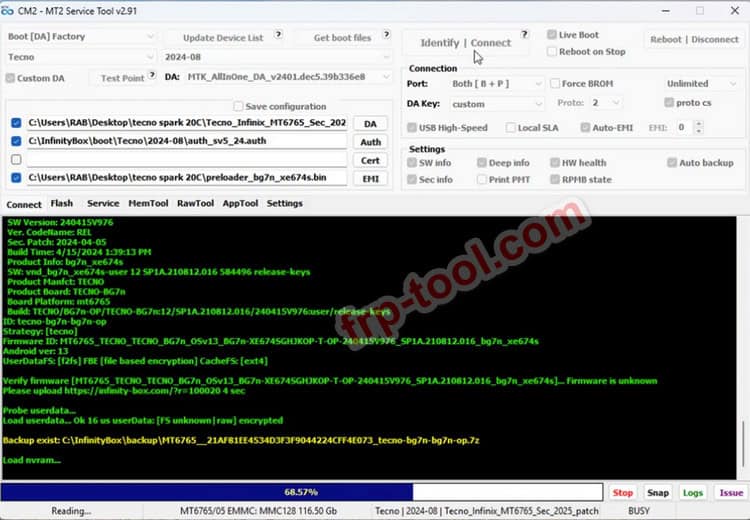
- CM2MT2 v3.02 The newest MediaTek tool with improved boot logic, enhanced loaders, updated SoC support, and better handling of complex MTK devices.
- CM2SP3 v2.43 Updated for Spreadtrum/Unisoc models with better FRP resets, enhanced diagnostic operations, and improved scan performance.
- Legacy modules CM2_MTK, CM2_SPD, CM2_QLM, CM2_RKT, and others for older or specialised devices.
- Boot-packs Loader packages for the newest chipsets and security updates.
- Dongle Manager Needed for firmware updates and module activation.
Together, these form the “latest setup” for 2026 rather than a single file.
Supported Platforms & Requirements
Operating systems
Infinity CM2 works on:
- Windows 7
- Windows 8 / 8.1
- Windows 10
- Windows 11
64-bit Windows 10 or 11 is recommended for best driver stability.
You can also read more:
Hardware & drivers
- CM2 dongle with smart card
- USB 2.0/3.0 ports
- Updated USB VCOM drivers for MediaTek
- SPD/Unisoc diagnostic drivers
- Qualcomm diagnostic drivers
- Visual runtimes if required by your system
Before beginning any repair, it’s essential to back up NVRAM, userdata, and IMEI-related partitions.
How to Safely Download the Infinity CM2 Latest Setup
The safest download method is always the official Infinity-Box support area. After logging into your IOS/Infinity account, download:
- CM2MT2 v3.02
- CM2SP3 v2.43
- Additional modules as needed
- Latest boot-packs
- Dongle Manager
Many archives use passwords like 12345678 or 1111.
Mirror Link: SPRD_UNISOC_4.21.39.134_pass-1111. Latest
Mirror Link: CM2MT2_v3.02 Latest Version
Avoid cracked versions; they regularly carry malware, outdated loaders, and can permanently damage devices.
Installation Guide (Fresh Setup or Upgrade)
Clean old versions
If upgrading:
- Remove outdated CM2 installations
- Restart your PC
- Keep backups of your logs and dumps
Update the dongle firmware
This ensures compatibility with the newest modules:
- Open Dongle Manager
- Insert the dongle into a direct USB port
- Let drivers install
- Click Update/Repair to upgrade firmware (latest required: 0168)
- Restart the PC if asked
Install platform drivers
Install the correct drivers for MTK, SPD/Unisoc, or Qualcomm, depending on your work. If Windows blocks unsigned drivers, use the advanced restart options to allow them temporarily.
Install modules and boot-packs
Run each installer individually:
- CM2MT2 v3.02
- CM2SP3 v2.43
- Legacy modules (optional)
- Boot-packs
Extract the files using the proper password when prompted.
Core Workflows Using the Infinity CM2 Setup (2026)
Flashing a MediaTek device with CM2MT2 v3.02
- Backup NVRAM and security data
- Load the scatter or firmware package in the Flash tab
- Connect the device in BROM or preloader mode
- Begin flashing and wait for completion
- Reboot and verify IMEI, network and functionality
The latest CM2MT2 updates improve handling of super partitions, new Infinix/Tecno/Realme/Oppo models, and advanced loader negotiation.
Resetting FRP or screen lock
- Choose the correct module (MT2 or SP3)
- Connect the device in the proper mode
- Select FRP or lock reset
- Complete initial setup once done
2026 builds include safer reset methods to minimise boot loops on newer phones.
Backup & restore
- Save NVRAM and calibration data before risky procedures
- Create full dumps on unique or uncommon models
- Restore partitions to fix network, calibration or boot issues
Bootloader work
Newer versions improve:
- Bootloader unlock helpers
- dm-verity repair
- Fixes for A/B slot boot loops
- Reading bootloader status for various brands
Troubleshooting the Latest CM2 Setup
Dongle not detected
Often caused by:
- Wrong USB port
- Outdated dongle firmware
- Damaged smart-card drivers
Fixes:
- Use a direct motherboard port
- Reinstall dongle driver
- Run Dongle Manager and repair firmware
Device not connecting
If the tool waits indefinitely for connection:
- Reinstall VCOM or SPD drivers
- Use a different cable
- Use the Force BROM option for problematic MTK devices
Version mismatch errors
- Update modules to the latest versions
- Ensure dongle firmware is current
- Install the proper boot-packs for recent devices
Safety, Legality and Data Responsibility
- Only work on devices you own or have explicit permission to repair
- Keep client backups secure and delete them after completion
- Inform customers about risks of operations like bootloader unlock
- Maintain a stable, clean workstation environment
High standards reduce data loss, protect client information and ensure reliability in every repair job.
Frequently Asked Questions
What is the latest Infinity CM2 MediaTek version for 2026?
CM2MT2 v3.02 is the newest MTK module with expanded device support and better boot logic.
Where do I download the Infinity CM2 latest setup?
The official Infinity-Box support area is always the safest option. Trusted mirrors help but must link to authentic files.
Does Infinity CM2 work without its dongle?
No. The system requires a licensed smart-card dongle.
Which Windows version is recommended?
Windows 10 or 11 (64-bit) offers the best driver compatibility and stability.
How often should I update CM2 modules?
Check for updates monthly or whenever working with newly released devices.