Phoenix Service Tool latest version continues to be one of the most relied-upon software repair utilities for mobile technicians. As Android devices grow in complexity and repair requirements shift, this tool has evolved to support newer brands, updated chipsets, and more advanced software-level operations.
This guide brings together everything.
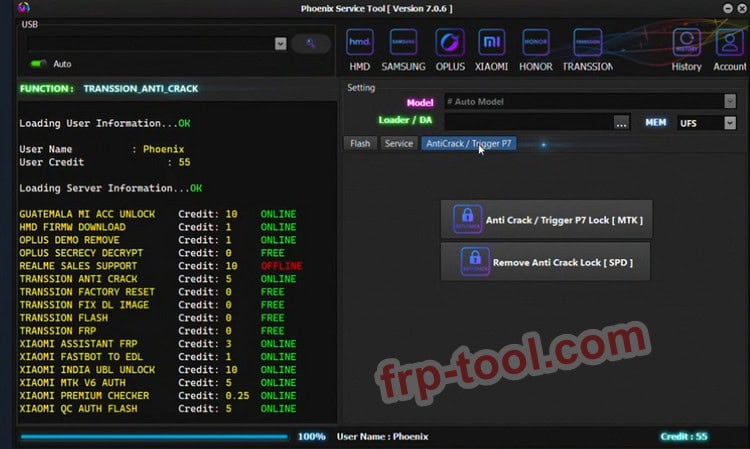
What Is Phoenix Service Tool Latest Version in 2026?
Phoenix Service Tool is a professional Windows program used for firmware flashing, software repairs, factory resets, and lock-handling operations across many Android brands. Repair technicians use it to recover dead, stuck, or damaged devices and perform detailed diagnostics. The software operates through a credit-based system and remains frequently updated to support modern security patches and new devices.
Used responsibly on devices you own or have explicit authorization to repair, Phoenix Service Tool helps restore functionality where typical consumer tools fall short.
ng you need to know in 2026 capabilities, supported models, workflow, pricing, safety considerations, and the best practices for getting the most from it.
Key Features of Phoenix Service Tool (2026 Edition)
Firmware Flashing & Software Repair
Phoenix Service Tool’s strongest capability is its ability to restore stock firmware on a wide range of Android devices. It helps repair:
- Boot loops
- Soft-bricked phones
- Failed OTA updates
- System corruption from malware or misconfiguration
It also allows firmware upgrades or downgrades when supported by the device and chipset.
Factory Reset & Authorized Screen-Lock Handling
Technicians can perform full resets, wipe data as part of repair procedures, or handle local screen locks (pattern, PIN, fingerprint) when the owner is present and authorizes the service.
FRP & Account-Related Repairs (With Caution)
The tool includes FRP-related workflows for brands such as Samsung, Xiaomi, Oppo, Realme, Nokia HMD, and more. These features must only be used on devices with valid proof of ownership.
Deep Device Information & Diagnostics
Phoenix Service Tool reads essential information needed for accurate repair:
- Model and variant
- Software version
- Security level
- IMEI, SKU ID, region and firmware codes
These checks help ensure that the correct firmware files and procedures are used.
Supported Brands & Device Ecosystem in 2026
Phoenix Service Tool has expanded support across most common Android manufacturers:
- Samsung
- Xiaomi / Redmi / Poco
- Oppo / Realme
- Nokia HMD
- OnePlus
- Honor
This wide coverage makes it valuable for repair shops managing multiple brands without switching between several tools or dongles.
Credit System, Pricing & Licensing
Phoenix Service Tool uses a credit-based model. You purchase credits from authorized resellers and they are consumed per advanced operation. This structure ensures access to server-based processes while keeping the software itself lightweight.
Typical notes for 2026:
- Credits are sold in minimum batches (e.g., bundles of 10).
- Costs vary by reseller and region.
- Official resellers include well-known servicing platforms such as GSMSERVER and other listed partners.
- Credits are tied to your account, so always verify your email when purchasing.
Avoid unofficial sellers or Telegram traders who cannot provide authorization proof. Unauthorized credits can lead to blocked accounts and failed operations.
Safe Downloading & System Requirements
Safety is essential when handling software repair tools. Follow these best practices in 2026:
Download Only From Trusted Sources
Stick to:
- The official website
- Verified distributors
- Established repair blogs that link to the original installer
Avoid cracked versions—they often contain malware, and many cause false positives or incomplete operations that can permanently damage devices.
Expect Antivirus Alerts
Low-level repair tools may trigger generic antivirus warnings. On a dedicated repair PC this is normal, though protections should be re-enabled after installation.
System Requirements
Phoenix Service Tool supports:
- Windows 7
- Windows 8
- Windows 10
- Windows 11
Technicians typically maintain a separate Windows laptop exclusively for flashing tools to minimize risk.
File Size: 70MB
Version: V7.0.6
Mirror Link: Phoenix Service Tool V7.0.6 Latest Version Download
How Phoenix Service Tool Fits Into a Professional Repair Workflow
Below is a realistic technician-friendly flow used in 2026.
Intake & Authorization
- Verify ownership
- Inform clients about possible data loss
- Document device condition before service
Diagnosis
- Inspect for hardware issues (water damage, power failures)
- Use Phoenix to read device information and confirm software status
Preparation
- Download accurate stock firmware
- Check software version, region, and security patch
- Ensure drivers and cables are in good condition
Repair Operations
Use Phoenix Service Tool for:
- Firmware flashing
- Factory resets
- Screen-lock handling (with owner authorization)
- FRP-related workflows on supported devices
Post-Repair Checks
Validate:
- Touchscreen
- Cameras
- Wi-Fi & mobile data
- Sensors
- SIM detection
Then guide the user through setup and secure password practices.
Troubleshooting Common Problems in 2026
Device Not Detected
- Missing or conflicting drivers
- Wrong connection mode (Fastboot, EDL, MTP)
- Damaged cable or USB port
Flash Fails or Stops Mid-Process
- Incorrect firmware chosen
- Incomplete or corrupted ROM files
- Unstable PC power or battery issues
Server / Authorization Errors
- Insufficient credits
- Incorrect login details
- Temporary server issues
Before retrying, technicians often re-check firmware compatibility or consult professional groups.
Phoenix Service Tool vs Alternatives
Professional Tools
- UMT
- Z3X
- MRT
- BEST
- Hydra
These offer brand-specific or dongle-based solutions, but Phoenix excels for cross-brand use in one interface.
Consumer Tools
- DroidKit
- Tenorshare utilities
- Mi Flash / Odin
These are easier for beginners, but lack the depth needed by repair professionals. Phoenix is preferred for full-level firmware and diagnostic control.
Content Strategy Notes (For Publishers Writing About Phoenix)
Search systems in 2026 elevate content that focuses on:
- Clear explanations
- Task-based sections (“How to…”, “What is…”, “Troubleshooting…”)
- Topic-cluster organization
- First-hand experience or real technician workflow
- People-first value
No special hacks are needed. High-quality, well-organized writing is what gets surfaced.
Frequently Asked Questions
Is Phoenix Service Tool safe?
Yes when downloaded from verified sources and used with proper care. Cracked or modified versions are unsafe.
Is it legal to use?
Yes, as long as you use it on devices you own or have explicit permission to repair. Unauthorized use on someone else’s device may be illegal in many regions.
Is Phoenix Service Tool still worth it in 2026?
Absolutely. With its continued updates, wide brand support, and powerful repair features, it remains a top choice for repair professionals.
Is this tool suitable for beginners?
Only with supervision. Flashing tools can permanently damage a device if misused. Beginners should start with guided solutions before moving to advanced repair software.
Final Thoughts
Phoenix Service Tool in 2026 remains a dependable and essential solution for technicians handling multi-brand Android repairs. With steady updates, broad device compatibility, and powerful diagnostic functions, it supports the needs of modern repair shops while maintaining a streamlined workflow. When used responsibly and safely, it can restore complex software faults and extend the life of countless smartphones.