T Tool Pro is a professional Windows-based mobile repair program used by technicians to unlock, repair, and flash Android smartphones and tablets from brands such as Samsung, Xiaomi, Redmi, Poco, Oppo, Realme, Vivo, Huawei, Honor, Infinix, Tecno, and others. It supports major chipsets including Qualcomm, MediaTek, and Unisoc, offering reliable tools for FRP removal, MDM and KG lock handling, screen-lock resets, firmware flashing, and NVRAM/EFS backup and recovery.
When used by trained professionals with proper consent from the device owner, T Tool Pro becomes a powerful solution for recovering phones stuck at Google verification, trapped in bootloops, or broken after failed updates.
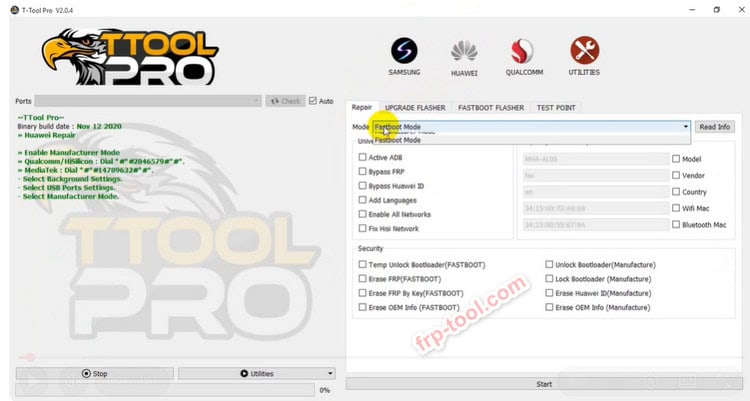
What Is T Tool Pro?
T Tool Pro is a specialized mobile repair suite designed to fix software-level issues on smartphones and tablets. Service centers use it to remove locks, repair corrupt software, restore broken partitions, and flash firmware on supported devices.
It connects through a PC and communicates directly with the device’s low-level system software, allowing technicians to perform operations that normal settings menus cannot handle.
How T Tool Pro Works
T Tool Pro runs on Windows and connects to the device via USB. After selecting the chipset or brand module, technicians can read device information, detect security patch levels, and choose the appropriate action.
A standard workflow includes:
-
Installing T Tool Pro on a Windows PC (Windows 7–11 supported).
-
Connecting the phone in download, preloader, fastboot, or EDL mode.
-
Reading hardware and software information.
-
Selecting the desired operation (FRP, reset, flash, repair).
-
Running the task and rebooting the device.
Because these processes interact with critical system partitions, backing up NVRAM/EFS is strongly recommended.
File Name: T Tool Pro
File Size: 35.68MB File
Password: Frp-tool
Mirror Link: T Tool Pro V5.0.16 Latest Version
Key Features Explained
FRP Removal & Screen-Lock Reset
-
Removes Google FRP lock after a factory reset.
-
Clears pattern, PIN, or password lock on supported models.
-
Provides one-click reset for many Samsung, Xiaomi, Oppo, Realme, Vivo, and Tecno devices.
These functions must only be used with full, verifiable permission from the device owner.
MDM & KG Lock Handling
T Tool Pro can remove or patch:
-
MDM locks found in managed corporate or educational devices.
-
KG/Knox Guard locks on Samsung models that limit usage.
This allows a device to be restored to normal operation once ownership is verified.
Firmware Flashing & Software Repair
When a phone is stuck on a logo, looping, or corrupted, flashing stock firmware often fixes the issue.
T Tool Pro supports:
-
Flashing on Qualcomm, MTK, and Unisoc devices
-
Scatter file flashing for MediaTek
-
EDL operations for Qualcomm
-
Partition management and restoration
These functions help revive devices after failed updates or mishandled modifications.
Bootloader & Critical Data Functions
Advanced control options include:
-
Bootloader unlock/relock
-
Reading/writing critical partitions
-
Managing dynamic partitions and A/B slots
Technicians use these features for deeper software repairs and custom recovery tasks.
Supported Brands, Chipsets & Models
T Tool Pro supports more than 4,000 models, including:
Chipsets
-
Qualcomm
-
MediaTek (MTK)
-
Unisoc / Spreadtrum
-
Limited support for Kirin where possible
Popular Brands
-
Samsung
-
Xiaomi / Redmi / Poco
-
Oppo / Realme / OnePlus
-
Vivo
-
Huawei / Honor
-
Motorola
-
Infinix / Tecno
-
ZTE and other regional brands
Recent updates expand support for Android 14 and Android 15 devices, ensuring coverage for new releases.
Latest Versions & What’s New
Recent versions focus on supporting new security patches and chipset generations.
Key updates across the v5.x series:
v5.0.9
-
Expanded support for Samsung MTK v6
-
New Honor MTK models
-
Additional Motorola MTK support
-
Permanent removal for select ID locks
v5.0.10
-
Improved handling of Oppo/Realme MTK devices
-
New Vivo MTK functions
-
One-click FRP for recent patches
v5.0.13
-
Extended Android 15 support
-
New coverage for Oppo, Realme, OnePlus, and Xiaomi models
v5.0.16
-
Added support for new Unisoc chipsets
-
Expanded Samsung Galaxy and Tab models
-
Added iCloud FMI off menu for users of the tool
Licensing
T Tool Pro is paid software and requires activation.
Unofficial or modified versions often:
-
Contain malware
-
Fail to receive updates
-
Put user data at risk
Professionals should always use the official licensed version.
Practical Use Cases
1. Removing FRP on a Samsung Phone
-
Enter download mode
-
Connect via USB
-
Select Samsung module
-
Choose FRP removal
-
Reboot
Resetting Newer Oppo/Realme Models
-
Connect in preloader mode
-
Enter MTK > Oppo/Realme module
-
One-click reset for supported security patches
Fixing a Bootlooping Xiaomi Device
-
Boot to fastboot or EDL
-
Load stock firmware
-
Back up NVRAM/EFS
-
Flash partitions
-
Reboot and test IMEI/network
Safety & Legal Considerations
-
Only service devices with verifiable owner permission.
-
Follow all local regulations.
-
Explain data-loss risks to customers.
-
Document each job for transparency.
These steps protect both the technician and the device owner.
Frequently Asked Questions
Is T Tool Pro free?
No. It requires a paid activation.
Does it work without a box or dongle?
Yes, recent editions are standalone software, though official activation is required.
Can it fix a hard-bricked phone?
If the device responds in EDL, download, or preloader mode, there is a good chance it can be revived.
Is it suitable for beginners?
It is built for experienced users. Incorrect usage can cause data loss or hardware damage.
Conclusion
T Tool Pro is one of the most capable mobile repair tools available today. With broad chipset support, frequent updates, and powerful one-click functions, it plays a crucial role in modern repair shops. When used responsibly, it can restore devices that would otherwise be considered beyond repair. For casual users with a single locked or damaged phone, visiting a professional remains the safest choice.