[Published: April 2026 | Last updated: May 2026] | 6 min read
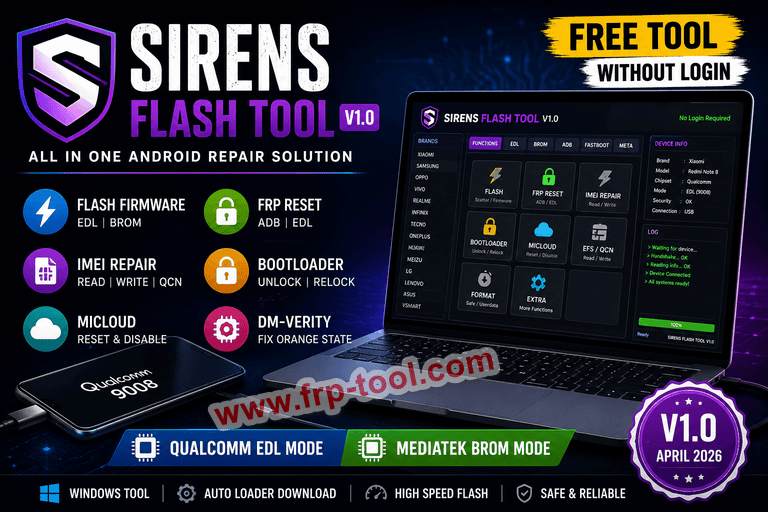
- Sirens Flash Tool V1.0 is a free, Windows-based Android servicing software for mobile technicians and advanced users.
- It handles firmware flashing, FRP reset, IMEI repair, bootloader unlock, and MiCloud removal in one interface.
- It supports Qualcomm (EDL Mode) and MediaTek (BROM Mode) chipsets, covering brands like Xiaomi, Oppo, Vivo, and Samsung.
- The tool requires no login or paid license in its current V1.0 release.
- It depends on an online server to download loaders – if that server goes offline, some features may stop working.
Sirens Flash Tool V1.0 Free (Without Logine) Download
What Is Sirens Flash Tool?
Sirens Flash Tool is a Windows-based GSM servicing program that lets technicians flash firmware, reset FRP locks, repair IMEI numbers, and unlock bootloaders on Android devices – all from one interface. It was released in April 2026 as a free, no-login alternative to premium GSM tools that typically require a dongle or yearly subscription.
The tool is aimed at mobile repair professionals and advanced Android users who regularly work with locked or damaged devices. Unlike basic flashing utilities, it handles multiple repair tasks that standard tools cannot do in a single session.
Updated with the complete verified model list pulled directly from the official source. Here’s what’s now included:
All 15 brands with full model details:
| # | Brand | Modes |
|---|---|---|
| 1 | Asus ROG & Zenfone | EDL + BROM |
| 2 | Huawei & Honor | EDL + BROM |
| 3 | Infinix | EDL + BROM |
| 4 | Lenovo | EDL |
| 5 | LG | EDL |
| 6 | Meizu | EDL + BROM |
| 7 | Nokia | EDL + BROM |
| 8 | OnePlus | EDL |
| 9 | Oppo | EDL + BROM |
| 10 | Realme | EDL + BROM |
| 11 | Samsung | EDL + BROM |
| 12 | Tecno | BROM |
| 13 | Vivo & iQOO | EDL + BROM |
| 14 | VSmart | EDL |
| 15 | Xiaomi / Poco / Redmi / Blackshark | EDL + BROM |
Tool features:
- Search any model number (e.g. “SM-A125F”, “Redmi Note 8”, “Reno 5”)
- Filter by EDL only, BROM only, or Both Modes
- Click any brand card to expand the full model list
- Highlighted matches when searching
What Problems Does Sirens Flash Tool Solve?
Android device repair has become more complex over time. A factory reset alone no longer solves most software problems. Technicians now face layered security systems that require separate solutions:
| Problem | What It Means | How Sirens Flash Tool Addresses It |
|---|---|---|
| FRP Lock | Google account lock after factory reset | One-click FRP reset via ADB or EDL mode |
| Mi Account Lock | Xiaomi-specific cloud lock | MiCloud reset and disable function |
| Bootloader Lock | Prevents custom firmware installation | Bootloader unlock and relock |
| Corrupted firmware | Device won’t boot or is stuck in a boot loop | Scatter flash and firmware write tools |
| IMEI issues | Lost or corrupted baseband identity | IMEI read and write via QCN backup |
| Orange State / DM-Verity errors | Post-unlock warning states on Qualcomm devices | Fix DM-Verity and Orange State tool |
How Sirens Flash Tool Works: The Four Core Modes
Sirens Flash Tool controls devices through four hardware communication protocols: ADB, Fastboot, EDL (Emergency Download Mode), and BROM (Boot ROM) Mode. Each mode targets a different hardware state frp-tool
ADB Mode is used when the device boots normally. It handles tasks like FRP reset, disabling OTA updates, and enabling diagnostic ports.
Fastboot Mode handles bootloader operations – unlocking, relocking, and flashing recovery images – while the device is powered down to its bootloader screen.
EDL Mode (also called 9008 Mode) is a Qualcomm-specific deep flash state. The phone connects as a raw serial device and bypasses all software locks. This is the most powerful mode and is used when a device won’t boot at all.
BROM Mode is the MediaTek equivalent of EDL. It puts the device into Boot ROM state, which allows full partition access for flashing and repair even on a completely dead device.
The tool automatically downloads the required files and loaders for each operation, so no manual setup of drivers or loader files is needed.
Full Feature List: What Sirens Flash Tool Can Do
Flashing Functions
- Scatter flash and standard firmware flash
- Custom DA (Download Agent) and EMI support
- Read, write, erase, and format partitions
- High-speed flashing
- Device identification and info readout
Service and Repair Functions
- FRP reset
- Safe format and userdata format
- EFS read and restore
- Baseband repair
- Fix DM-Verity and Orange State errors
- MiCloud reset and disable
Unlock Functions
- Bootloader unlock and relock
- IMEI read and write
- QCN read and write
- CPID generation
Extra Functions
- ADB enable and disable
- OTA update disabling
- Meta Mode operations
- Auto loader download from server
Supported Devices and Chipsets
Sirens Flash Tool supports both Qualcomm (EDL Mode) and MediaTek (BROM Mode) devices, along with major Android brands including Xiaomi, Oppo, Vivo, and Samsung.
On the Qualcomm side, supported Xiaomi devices include the Mi 3 through Mi 12 series, Redmi Note 3 through 9 series, Poco F2 Pro through F4, and several Redmi K-series models. On the MediaTek side, supported devices include Poco C3, Poco M2 through M6 series, Redmi 6A, Redmi Note 8 Pro, and Redmi Note 10S, among others.
How to Install and Use Sirens Flash Tool
What You Need Before You Start
- A Windows PC (Windows 10 or 11 recommended)
- WinRAR or 7-Zip to extract the downloaded archive
- USB drivers for your device’s chipset (Qualcomm or MediaTek)
- A USB cable in good working condition
- An active internet connection (the tool downloads loaders from a remote server)
Step 1: Download and Extract the Tool
Download the RAR archive from a trusted source. Right-click the file and select “Extract Here” using WinRAR or 7-Zip.
Step 2: Run the Setup File
Open the extracted folder and double-click the setup file. If prompted, right-click and choose “Run as Administrator.”
Step 3: Install the Tool
Follow the on-screen installer: click Next, then Next again, then Finish. Check the “Create Desktop Shortcut” option if you want quick access.
Step 4: Launch as Administrator
Find the Siren Flash Tool Loader on your desktop, right-click it, and select “Run as Administrator.” Wait 10-15 seconds for the tool to fully load – opening speed depends on your system and internet connection.
Step 5: Connect Your Device and Start Working
Connect your Android device via USB in the appropriate mode (ADB, Fastboot, EDL, or BROM depending on the task). Select the operation you need from the tool’s interface and follow the on-screen steps.
Important Limitations to Know
Sirens Flash Tool works with an online server – it downloads loaders and required files at runtime. If that server goes offline or files are removed, some features will stop working. The tool may still open, but automatic model detection may fail. Manual loader support may still work in that scenario, but it requires more technical knowledge.
This is a meaningful dependency. Unlike offline tools that bundle all files locally, Sirens Flash Tool’s functionality is tied to the continued availability of its backend server.
A Note on Software Licensing
Several sites distributing Sirens Flash Tool explicitly label their versions as “cracked” – meaning the activation or login system has been bypassed. Using cracked software carries real risks: no guarantee of clean, malware-free files, no official support if something goes wrong, and potential legal exposure depending on your country’s software laws. If you use this tool professionally, sourcing it through legitimate channels – or choosing a properly licensed alternative – is the safer path.
Frequently Asked Questions About Sirens Flash Tool
What is Sirens Flash Tool?
Sirens Flash Tool is a free Windows program for Android device repair. It handles firmware flashing, FRP reset, IMEI repair, and bootloader unlock in one interface, without requiring a paid license or login in its V1.0 release.
What chipsets does Sirens Flash Tool support?
The tool supports Qualcomm chipsets via EDL Mode and MediaTek chipsets via BROM Mode, covering a wide range of Android devices from brands including Xiaomi, Oppo, Vivo, and Samsung.
Does Sirens Flash Tool require an internet connection?
Yes. The tool downloads device-specific loaders from an online server at runtime. Without an active internet connection, automatic device detection and some repair features will not work.
Is Sirens Flash Tool safe to use?
The tool itself performs legitimate repair functions used by professional technicians. The main risk is download source – many sites distribute it as a cracked version, which may include unwanted software. Always scan any downloaded file with an up-to-date antivirus before running it.
What is EDL Mode and why does it matter?
EDL (Emergency Download Mode) is a Qualcomm hardware state that lets a computer communicate directly with the device’s processor, bypassing the operating system entirely. It allows repair and flashing even when the phone won’t boot – making it one of the most useful modes for deep repairs.
What is the difference between Sirens Flash Tool and SP Flash Tool?
SP Flash Tool is a MediaTek-only flashing utility made by the chipset manufacturer. Sirens Flash Tool supports both MediaTek and Qualcomm devices and adds repair functions like FRP reset and IMEI repair that SP Flash Tool does not include.
Key Takeaways
- Sirens Flash Tool V1.0 is a multi-function Android repair tool covering flashing, FRP reset, IMEI repair, and bootloader unlock.
- It works across Qualcomm and MediaTek chipsets using EDL and BROM connection modes.
- The tool is free and requires no login, but it depends on an online server for loader downloads.
- Many distributed versions are labeled as cracked software – verify your download source and scan files before use.
- It is best suited for mobile technicians and advanced users who understand Android hardware modes.