[Published: May 23, 2026 | Last updated: May 23, 2026] | 9 min read
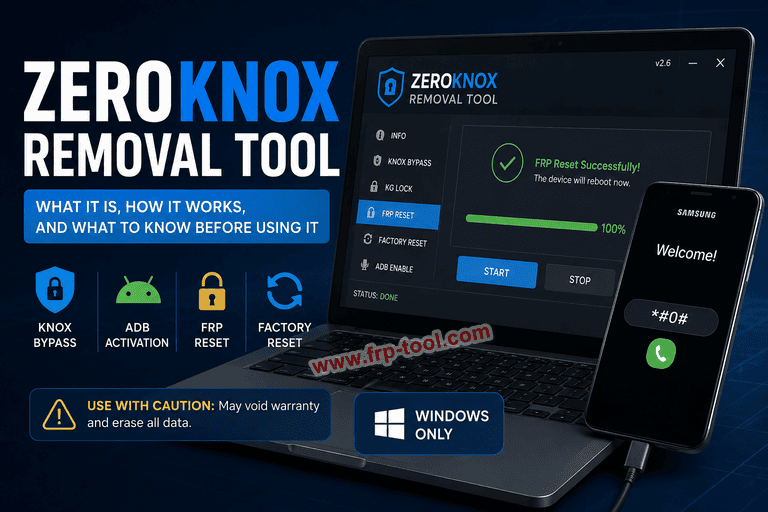
- ZeroKnox Removal Tool is a free, Windows-only program that bypasses Samsung Knox, KG Lock, and FRP (Factory Reset Protection) on supported Samsung devices.
- It works by enabling ADB (Android Debug Bridge) through MTP mode using the Samsung diagnostic code
#0#, then executing lock-removal commands over a USB connection. - Using ZeroKnox permanently triggers the Knox Warranty Bit, which voids your Samsung warranty and disqualifies the device from official repairs.
- The tool has no official developer website; downloads come from third-party repositories, which carries real malware risk.
- As of 2026, reliability is limited – success depends heavily on the Samsung model, Android version, and current security patch level.
Download: ZeroKnox Removal Tool Latest Version
What Is ZeroKnox Removal Tool?
ZeroKnox Removal Tool is a free, Windows-based program designed for Samsung phones locked by FRP or Knox Guard. It disables certain security restrictions, enables connection modes such as ADB or MTP, and helps users remove Google account verification on supported devices.
It targets two specific Samsung security systems: Knox (Samsung’s built-in enterprise security framework) and FRP (Google’s Factory Reset Protection, which requires the original Google account after a reset). The tool is used most often by people who bought a second-hand Samsung phone still locked to a previous owner’s account, or by phone repair technicians handling devices with corporate Knox locks.
It is a Windows-only utility for advanced users – not a general-purpose unlocking app.
Read more: King Soft Team Tool
What Samsung Knox Is and Why It Gets in the Way
Samsung Knox is a security layer built directly into Samsung hardware and software. It is a top-level data protection solution developed by Samsung to protect devices from malicious tampering and attacks, especially in cases of device loss or theft.
Knox runs in two situations that commonly cause access problems:
- Enterprise/corporate use: IT departments use Knox through MDM (Mobile Device Management) or EMM (Enterprise Mobility Management) systems to lock down company phones. When an employee leaves and the device is not properly de-enrolled, the lock stays active.
- Knox Guard (KG Lock): Samsung’s carrier and finance partner program that locks devices to financing agreements. A phone bought on installments and reported as unpaid gets a KG lock applied remotely.
Knox activates automatically when certain changes occur, such as flashing firmware or unlocking the bootloader. Once triggered, it blocks normal device access without going through the proper administrative removal process – which requires credentials most users no longer have
What ZeroKnox Removal Tool Actually Does
ZeroKnox is a utility tailored for Samsung smartphones and tablets to remove EMM and MDM security systems. The tool has five main functions:
| Feature | What It Does |
|---|---|
| Knox Bypass | Disables Samsung Knox security restrictions |
| ADB Activation | Enables Android Debug Bridge via MTP mode using diagnostic code #0# |
| KG Lock Removal | Provides methods to bypass Knox Guard locks |
| FRP Reset | Removes Factory Reset Protection to bypass Google account verification |
| Factory Reset | Resets the device to factory state through MTP or Download mode |
To execute the FRP bypass, the Samsung device must be connected in MTP mode, and users must dial the diagnostic code #0# via the Emergency Call screen to enable ADB. This sequence completely erases all existing device data.
The tool does not work wirelessly. ZeroKnox is a Windows-based program and requires a computer plus a USB connection to the Samsung phone.
Read more: Pandora Box Tool Updated
How to Use ZeroKnox Removal Tool: Step by Step
What you need before starting:
- A Windows PC (Windows 7 or later)
- Samsung USB drivers installed
- A USB cable
- The ZeroKnox zip file downloaded from a known repository
- Your antivirus temporarily disabled (the tool triggers false positives)
Step 1: Download and extract the tool
Download the ZeroKnox zip file. After downloading, unzip or extract the files. No password is needed for this step. Make sure your antivirus or Windows Defender is turned off before you proceed.
Step 2: Install Samsung drivers and launch the tool
Open the “ZeroKnox Removal.exe” file to launch the program. Download and install the Samsung drivers for your phone if not already installed.
Step 3: Connect your device and enter diagnostic mode
Connect your Samsung phone to the PC via USB. Use the Emergency Call screen and dial *#0*# or #0#. This activates test mode on the Samsung phone.
Step 4: Enable ADB and run the bypass
Click “Enable ADB,” then press “Reset FRP (ADB mode).” The device will restart several times during this process. Once complete, the FRP or Knox restriction is removed.
Important: All user data on the device is erased during this process. Back up anything you need beforehand if you still have partial access to the phone.
Risks You Need to Know Before Using ZeroKnox
Using ZeroKnox is not a neutral action. There are four specific risks worth understanding clearly before you run the tool.
Permanent warranty void
Modifying system files with this tool permanently activates the Knox Warranty Bit, disqualifying the phone from official manufacturer repairs. Samsung checks this bit during any service visit. Once it is flipped, there is no way to reverse it.
No official source
ZeroKnox is not distributed from an official Samsung or verified developer website, so users should be cautious about security risks, antivirus warnings, and limited reliability. Downloads come from third-party repositories, and versions vary across sites. There is no way to verify which version is genuine.
Limited compatibility in 2026
ZeroKnox Removal Tool may still work on a small number of older Samsung devices, but it is not a consistently reliable solution in 2026. It may fail because of unsupported device models, newer Android versions, updated security patches, missing Samsung USB drivers, unsuccessful ADB activation, or an unstable USB connection.
Data loss is certain
The FRP bypass process wipes the device. If you are hoping to recover data and bypass the lock at the same time, ZeroKnox does not offer that. The reset is total.
ZeroKnox Removal Tool vs. Paid Alternatives
ZeroKnox is free, but free comes with the tradeoffs above. Here is how it compares to the main paid alternatives:
| Tool | Cost | Official Support | Compatibility | Data Loss |
|---|---|---|---|---|
| ZeroKnox Removal Tool | Free | No | Older Samsung models | Yes |
| Wondershare Dr.Fone | Paid | Yes | Broad Android support | Varies |
| iMobie AnyUnlock | Paid | Yes | Samsung + other Android | Varies |
| UnlockGo (iToolab) | Paid | Yes | Samsung + Android | Varies |
Paid tools generally offer verified downloads, customer support, and higher success rates on newer firmware. If the device is a recent Samsung model running Android 14 or 15, a paid tool with active compatibility updates is a more dependable choice than ZeroKnox.
You can also read more: Download Google Pixel Token Tool
Common Mistakes to Avoid with ZeroKnox
- Keeping antivirus active during the process: Windows Defender and most antivirus programs flag ZeroKnox as a threat. This does not confirm the tool is malware, but it does mean you need to disable protection before running it – and understand you are taking a risk by doing so.
- Downloading from random sites: Multiple versions of ZeroKnox circulate online with different version numbers. Stick to well-known Android tool repositories and verify the file matches the expected size before running it.
- Skipping the Samsung USB driver install: The tool cannot communicate with the device without proper drivers. If ADB activation fails, missing or outdated drivers are the most common cause.
- Expecting it to work on new devices: Compatibility becomes much less predictable on newer Android versions and Samsung phones with recent firmware updates. Check whether your specific model and Android version are confirmed as supported before proceeding.
- Thinking it is reversible: The Knox Warranty Bit flip is permanent. Treat this as a one-way decision.
Frequently Asked Questions About ZeroKnox Removal Tool
What is ZeroKnox Removal Tool?
ZeroKnox Removal Tool is a free, Windows-only utility for advanced users to bypass Factory Reset Protection (FRP) and disable Knox or KG locks strictly on Samsung devices, though it permanently voids warranties and risks bricking the phone.
Does ZeroKnox work on the latest Samsung phones in 2026?
ZeroKnox Removal Tool may still work on a small number of older Samsung devices, but it is not a consistently reliable solution in 2026. Success depends on the specific model, Android version, and security patch level. Newer Samsung flagship models with recent firmware are unlikely to be compatible.
Is ZeroKnox Removal Tool safe to download?
The tool is not distributed from an official developer site. ZeroKnox can trigger warnings on your antivirus program, so be cautious and know the associated risks whenever you are using this tool. Only download from established Android tool repositories, and never run the executable without checking the source.
Will using ZeroKnox delete my data?
Yes. The FRP bypass sequence completely erases all existing device data. There is no version of this process that preserves user files. If data recovery matters, explore a professional data recovery service before running any unlock tool.
What is the difference between Knox and FRP?
Knox is Samsung’s own enterprise security framework, applied through corporate MDM/EMM systems or Knox Guard financing locks. FRP (Factory Reset Protection) is a Google feature active on all Android devices since Android 5.0, which requires the original Google account credentials after a factory reset. ZeroKnox targets both, but through separate functions within the tool.
Does ZeroKnox work without a computer?
ZeroKnox is a Windows-based program and requires a computer plus a USB connection to the Samsung phone. There is no mobile-only version of the tool.
What happens to my Samsung warranty after using ZeroKnox?
Using ZeroKnox permanently activates the Knox Warranty Bit, disqualifying the phone from official manufacturer repairs. Samsung service centers check this bit before accepting devices for repair. The change cannot be undone.
Key Takeaways
- ZeroKnox Removal Tool is a free, Windows-only program for bypassing Samsung Knox, KG Lock, and FRP on supported Samsung devices.
- It works through ADB activation using the Samsung diagnostic code
#0#, and requires a USB connection, Samsung drivers, and antivirus disabled. - Using the tool permanently voids your Samsung warranty by triggering the Knox Warranty Bit – there is no way to reverse this.
- Reliability in 2026 is limited to older Samsung models; newer devices with updated firmware are unlikely to respond to ZeroKnox.
- No official developer site exists for this tool; always download from a known repository and treat every version with appropriate caution.