[Published: DATE | Last updated: DATE] | 6 min read
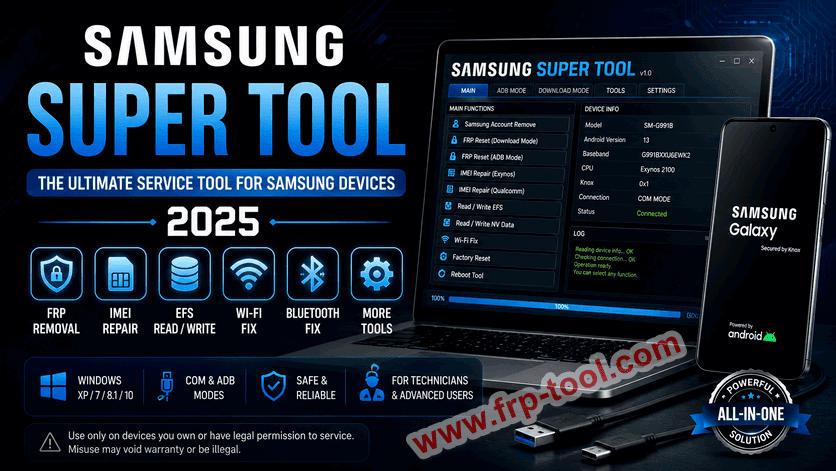
- Samsung Super Tool is a free, third-party Windows utility for servicing Samsung Android devices – it is not made by Samsung Electronics.
- It handles FRP removal, IMEI repair, Wi-Fi and Bluetooth fixes, EFS read/write, and Samsung account removal from one interface.
- The tool runs in both COM and ADB mode and works on Windows XP, 7, 8.1, and 10.
- It was developed by Yusuf Al-Khabour (SPR-TEAM) and is aimed at repair technicians and advanced Android users.
- Use it only on devices you own or have explicit permission to service – misuse can void warranties or brick the device.
Download Samsung Super Tool
Passeord: SPR-REAM
What Is Samsung Super Tool?
Samsung Super Tool is a free Windows program that lets technicians and advanced users perform service and repair operations on Samsung Android devices. It handles tasks like FRP lock removal, IMEI repair, Wi-Fi fixes, and EFS data access – all from one interface, without needing separate tools for each job.
It is a third-party utility developed by Yusuf Al-Khabour under the SPR-TEAM label. It has no official affiliation with Samsung Electronics. The tool operates in both COM mode (for hardware-level access) and ADB mode (Android Debug Bridge, for software-level access), which makes it useful across a wide range of repair scenarios.
Who Samsung Super Tool Is For
Samsung Super Tool is designed for two groups: mobile repair technicians and advanced Android users.
Repair shops use it to speed up common service tasks – removing FRP locks, fixing dead IMEI numbers, and restoring EFS partitions – without switching between five different programs. Advanced users who have already voided their warranty and are comfortable with flashing tools use it for deeper device management, such as reading NV data or fixing DRK (Device Root Key) errors.
It is not a tool for everyday Samsung phone users. If your device has a software glitch, a frozen screen, or a broken app – Samsung’s own service centers or Smart Switch are the right starting point. Samsung Super Tool is for situations where standard methods have already failed.
Read more: BMT Pro Android Tool
Full Feature List: What Samsung Super Tool Can Do
Samsung Super Tool packs a large number of service functions into one window. Here is the complete feature set based on version 1.0 (Fidetec, 2020):
Account and lock removal:
- Samsung Account Remove
- FRP Reset (via Download Mode and ADB Mode)
- Screen Lock (data loss method)
- Remove Security Notes
- Remove RMM via Root
IMEI and network repair:
- IMEI Repair (Exynos chipsets)
- IMEI Repair (Qualcomm chipsets)
- Fix “IMEI Unsupported” error after repair
- Network Repair
Connectivity fixes:
- Wi-Fi Fix (standard)
- Wi-Fi Fix – Run method
- Wi-Fi Fix – Forget method
- Bluetooth Fix
- Fix MIPI errors
Device data and partitions:
- Read Device Info
- Read / Write EFS
- Read / Write NV data
- Wipe NV
- Write NV
- Read / Write Security
- Read / Write SN (Serial Number)
- Read to PIT (partition information table)
- Wipe / Reset EFS
Other operations:
- Factory Reset
- Reset MSL (Master Subsidy Lock)
- DRK Fix (Device Root Key)
- Fix S-Health data
- Reboot Tool
System Requirements and Compatibility
Samsung Super Tool runs only on Windows. Here is what you need before installing it:
Read more: Infinix USB Drivers
| Requirement | Detail |
|---|---|
| Operating system | Windows XP, 7, 8.1, or 10 |
| Architecture | 32-bit and 64-bit both supported |
| Samsung USB drivers | Must be installed before connecting a device |
| USB cable | Original or high-quality data cable (not a charge-only cable) |
| Antivirus | Must be disabled during installation and use |
| Installation password | SPR-TEAM |
The tool targets Samsung Android devices. Compatibility with specific models varies by firmware version and chipset type – Exynos and Qualcomm models have separate IMEI repair functions because the underlying partition structures differ between the two.
How to Install and Run Samsung Super Tool
Follow these steps in order. Skipping any step – especially the antivirus step – is the most common cause of installation failure.
Step 1: Install Samsung USB drivers Download and install the official Samsung USB drivers on your Windows PC before anything else. Without them, the tool cannot detect a connected device. Samsung Kies or Smart Switch both install the necessary drivers automatically if you prefer that route.
Step 2: Disable antivirus and Windows Defender Third-party service tools like this one are frequently flagged as false positives by antivirus software because they access low-level device partitions. Turn off your antivirus and Windows Defender before running the installer. Re-enable them after you finish.
Step 3: Run the installer Open the Super Tool v1.0.exe file. It will immediately ask for a password. Enter SPR-TEAM and click Next. Follow the remaining prompts to complete installation.
Step 4: Connect your Samsung device Connect the Samsung device via USB. Depending on the function you plan to use, set the device to either Download Mode (Volume Down + Bixby + Power, or use the in-app reboot option) or ADB Mode (enable USB Debugging in Developer Options first).
Step 5: Select your function and run Open Samsung Super Tool. The interface shows all available functions. Click the one you need, confirm your device appears in the detection field, then start the operation. Do not disconnect the USB cable mid-process.
You can also read more: T Tool Pro
Common Mistakes to Avoid with Samsung Super Tool
- Running it with antivirus active: Antivirus software blocks the tool’s access to system-level files and can corrupt an operation mid-run. Always disable it before launching the tool, not after.
- Using a charge-only USB cable: Many USB cables sold today carry power only – no data lines. If the tool fails to detect your device, try a different cable before assuming a driver or software problem.
- Confusing Exynos and Qualcomm IMEI repair functions: The tool has separate IMEI repair options for each chipset type. Using the wrong one on the wrong device does nothing at best, and can cause further partition errors at worst. Check your device’s chipset in the Read Info section before choosing a repair function.
- Skipping a data backup before EFS operations: Reading EFS is safe. Writing to or wiping EFS is not reversible without a backup. Always pull a Read EFS backup before you run any write or wipe operation.
- Using it on devices you don’t own: Samsung Super Tool bypasses security features. Using it to remove FRP or account locks on a device you don’t own is illegal in most countries. The tool is for authorized repair and personal device servicing only.
Frequently Asked Questions About Samsung Super Tool
What is Samsung Super Tool?
Samsung Super Tool is a free third-party Windows utility for servicing Samsung Android devices. It bundles common repair functions – FRP removal, IMEI repair, EFS access, Wi-Fi and Bluetooth fixes – into one program. It was developed by Yusuf Al-Khabour (SPR-TEAM) and is not made or endorsed by Samsung Electronics.
Is Samsung Super Tool free?
Yes. Version 1.0 is free to download. There is also a separate paid variant called Samsung Super Tool PRO, developed by GSM Asif Khan, which adds device diagnostics, firmware handling, and data backup features aimed at professional repair shops.
What is the difference between Samsung Super Tool and Z3X Samsung Tool PRO?
Samsung Super Tool is free and focused on a specific set of repair tasks. Z3X Samsung Tool PRO is a paid, professional-grade platform that requires a hardware dongle, supports a broader range of Samsung models across more chipsets, and is updated more frequently. Z3X is the better choice for shops servicing large volumes of devices; Samsung Super Tool suits individual repairs.
Does Samsung Super Tool work on Windows 11?
The official compatibility listed for Samsung Super Tool V1.0 covers Windows XP, 7, 8.1, and 10. Windows 11 is not confirmed. For Windows 11 users, running it in compatibility mode (set to Windows 10) may work, but results are not guaranteed.
Can Samsung Super Tool brick my device?
Yes, if used incorrectly. Operations like Wipe EFS or Write NV alter core partition data. If the process is interrupted – by a disconnected cable, dead battery, or a wrong option selected – the device can become unresponsive. Always back up EFS data before any write operation and keep the device charged above 60% before starting.
Is it legal to use Samsung Super Tool to remove FRP?
It is legal if you are removing FRP from a device you own. Using it to bypass FRP on a device you did not purchase – or one reported stolen – is illegal under computer fraud laws in most countries. The same rule applies to removing Samsung Account locks from devices with a third-party ownership dispute.
Key Takeaways
- Samsung Super Tool is a free Windows service utility for Samsung Android devices, not an official Samsung product.
- It covers FRP removal, IMEI repair for both Exynos and Qualcomm chipsets, EFS read/write, connectivity fixes, and Samsung account removal.
- It requires Samsung USB drivers, antivirus disabled, and the installation password
SPR-TEAMto set up correctly. - Always back up EFS data before running any write or wipe operation – these changes are not easily reversible.
- Use it only on devices you own or have legal authorization to service.