[Published: DATE | Last updated: May 23, 2026] | 8 min read
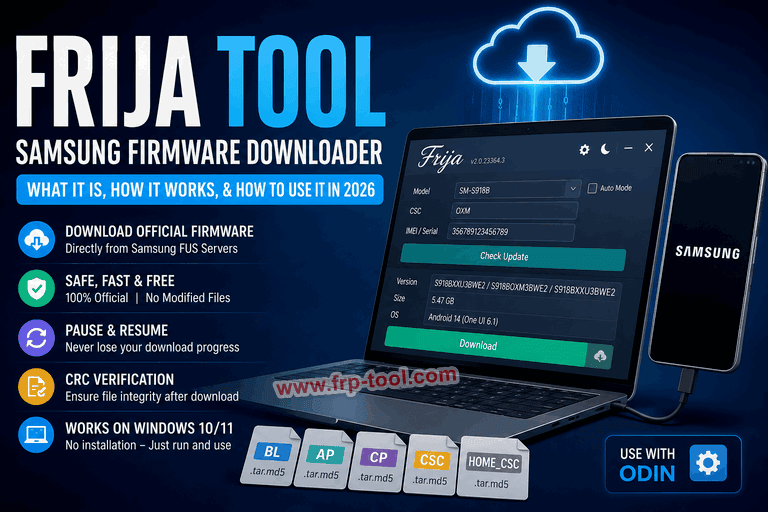
- Frija is a free Windows tool that downloads official Samsung firmware directly from Samsung’s Firmware Update Server (FUS) – no third-party sites involved.
- The latest version is v2.0.23364.3, developed by XDA Senior Member SlackingVeteran (also credited as wssyncmldm).
- It works on Windows 10 and 11 only, and requires .NET Core 3.1 Desktop Runtime (x86) installed.
- Use Frija to recover a bricked phone, unroot a device, skip slow OTA updates, or downgrade firmware.
- Frija replaced the now-discontinued SamFirm tool and remains the most widely used free Samsung firmware downloader as of 2026.
Download: Frija Tool v2.0.23364 Samsung Firmware Downloder
What Is Frija Tool?
Frija is a free Samsung firmware downloader for Windows. It connects directly to Samsung’s official Firmware Update Server (FUS) and pulls the exact firmware files Samsung distributes through its own over-the-air (OTA) update system – giving you full-speed downloads of unmodified, official firmware files without paying for a third-party database subscription.
Frija is the successor to the now-deprecated SamFirm tool. It was created by XDA developer wssyncmldm, with contributions from CrazyApe and eragon5779. The name itself comes from Norse mythology: Frija was the wife of Odin – the name of Samsung’s own firmware flashing software – making Frija a fitting companion tool in the same naming convention.
Frija is not an app you install on your Samsung phone. It runs on a Windows PC and downloads firmware files that you then flash to your device using Odin.
Read more: Samsung Flash Drive Repair Tool
Why Frija Exists: The Problem It Solves
Most websites that host Samsung firmware (SamMobile, SamFrew, Updato) slow your download speed unless you pay for a premium plan. The huge volume of Samsung devices and their firmware files demands expensive server hosting, which is why these sites push premium memberships for faster speeds.
Frija pulls firmware images directly from Samsung’s own servers, so users get the latest firmware versions for their specific device models without any speed caps or paywalls.
The result: full-speed, free downloads of the same firmware files Samsung ships through OTA – every time.
How Frija Works: From Request to File
Frija acts as a front-end client for Samsung’s FUS (Firmware Update Server). Here is what happens when you use it:
- You enter your device details – model number, CSC (regional code), and IMEI/serial number. In Auto mode, Frija detects these automatically when your phone is connected via USB.
- Frija queries Samsung FUS – it sends your device details to Samsung’s servers and retrieves the latest available firmware for that exact model and region.
- The firmware downloads directly – no third-party websites are involved at any point in the process.
- Files are decrypted and verified – Frija handles decryption of the firmware package and offers CRC (Cyclic Redundancy Check) verification to confirm the downloaded file is intact.
- You flash with Odin – Samsung firmware comes as five binary files in .tar.md5 format: BL, AP, CP, CSC, and HOME_CSC. Frija downloads all of them. You then flash them using Odin.
Frija can pause and resume downloads even after a network interruption or app restart – so a broken connection does not force you to start over.
Read More: Samsung USB Drivers
What Frija Is Used For
Device recovery – If your Samsung phone is stuck in a boot loop or bricked after a failed update, Frija lets you download the correct firmware to restore the device to its working stock state.
Unrooting – If you have a rooted Android phone and want to restore the device warranty, Frija downloads the stock ROM needed to unroot and return the phone to factory condition.
Skipping OTA delays – Samsung rolls out OTA updates in batches by region. Frija lets you download the latest firmware the moment Samsung releases it, without waiting for the update to reach your region.
Firmware downgrading – Frija supports downloading older firmware versions, which SamFirm (its predecessor) did not allow. This is useful when a new update introduces bugs and you need to roll back.
Custom ROM reversal – If you installed a custom ROM and want to go back to stock Android, Frija gives you the original firmware to flash back.
System Requirements for Frija Tool
Frija is only compatible with Windows 10 and 11. There is no official support for macOS, Linux, or Android.
The latest version, v2.0.23364.3, requires the x86 version of .NET Core 3.1 Desktop Runtime (v3.1.21) even on 64-bit Windows systems.
If you are on Linux or macOS, the alternative tools are Samloader or Bifrost, which offer similar firmware downloading via the command line.
What you need before using Frija:
- A Windows 10 or 11 PC (32-bit or 64-bit)
- .NET Core 3.1 Desktop Runtime (x86) installed
- Your Samsung device’s model number and CSC code
- Your device’s IMEI or serial number (required in manual mode as of recent versions)
- A stable internet connection for large firmware files (typically 3-6 GB)
- Odin installed separately for flashing the downloaded firmware
How to Use Frija Tool: Step by Step
Step 1: Install .NET Core 3.1 Runtime Download and install the x86 version of .NET Core 3.1 Desktop Runtime from Microsoft’s official site. Restart your PC after installation.
Step 2: Download and launch Frija Download the latest Frija zip from the official XDA thread or GitHub. Extract the zip and double-click Frija.exe. No installation needed – it runs directly.
Step 3: Choose Manual or Auto mode
- Auto mode: Connect your Samsung phone to your PC via USB with USB Debugging enabled. Frija uses the Samsung Smart Switch API to detect your device model, CSC, and firmware version automatically. Click “Check Update.”
- Manual mode: Enter your device’s model number, CSC, and IMEI/serial number manually, then click “Check Update.”
Step 4: Download the firmware Once Frija finds the latest firmware for your device, click “Download.” The tool will fetch all five firmware binaries (BL, AP, CP, CSC, HOME_CSC) directly from Samsung FUS.
Step 5: Flash with Odin After the download completes, extract the firmware files using WinRAR or 7-Zip. Open Odin, connect your Samsung phone in Download Mode, assign each file to the correct slot in Odin (BL, AP, CP, CSC), and start the flash.
Frija vs. SamFirm vs. Other Samsung Firmware Tools
| Tool | Status | Download speed | Older firmware | Platform |
|---|---|---|---|---|
| Frija | Active (v2.0.23364.3) | Full speed | Yes | Windows only |
| SamFirm | Discontinued | Full speed | No | Windows only |
| Samloader | Active | Full speed | Yes | Windows, Linux, macOS |
| SamMobile (free) | Active | Throttled | Yes | Web-based |
| Updato (free) | Active | Throttled | Yes | Web-based |
SamFirm works similarly to Frija, but does not allow downloading older firmware versions – a key advantage Frija holds. Samloader is the closest cross-platform alternative for non-Windows users.
Common Mistakes to Avoid with Frija
- Wrong model number or CSC: Selecting incorrect firmware may cause boot loops, software issues, or complete device malfunction. Always double-check the model number and CSC before downloading.
- Skipping the IMEI field: Recent versions of Frija require the IMEI or serial number in manual mode. Leaving it blank will prevent Samsung FUS from returning firmware results.
- Using the wrong .NET version: Frija v2.x requires the x86 version of .NET Core 3.1, not the x64 version. Installing the wrong one will prevent the app from launching.
- Not running as Administrator: If Frija fails to load or connect, close it and relaunch with right-click → “Run as Administrator.”
- Flashing firmware from the wrong region: CSC codes are region-specific. Flashing a firmware with a CSC from a different country can change carrier settings and affect features like VoLTE or Samsung Pay.
- Corrupted downloads: If the flash fails after downloading, re-download the firmware. Large files can corrupt on unstable connections. CRC verification in Frija’s settings helps catch this before you attempt the flash.
You can also read more: Root Samsung Galaxy Tab S2 8.0 SM-T713 Using Odin
Frequently Asked Questions About Frija Tool
What is Frija Tool?
Frija is a free Windows application that downloads official Samsung firmware directly from Samsung’s Firmware Update Server (FUS). It replaced the discontinued SamFirm tool and is used to recover bricked devices, unroot Samsung phones, or install firmware updates without waiting for OTA rollouts.
Is Frija Tool safe to use?
Yes. The firmware Frija downloads is encrypted and unmodified – the exact same files Samsung distributes through its own OTA update system. Frija itself has no background or startup services and does not modify your device without your action.
What is a CSC code and where do I find it?
CSC stands for Consumer Software Customization. It is a three-letter regional code that identifies the firmware variant for your country and carrier (for example, XEO for unlocked Europe, DBT for Germany, OXM for Southeast Asia open market). You can find your CSC by dialing *#1234# on your Samsung phone and checking the “CSC” line.
What is the difference between Frija and Odin?
Frija downloads firmware files from Samsung’s servers. Odin installs (flashes) those files onto your Samsung device. You need both to complete a full firmware install – Frija to get the files, Odin to apply them.
Can I use Frija on Mac or Linux?
No. Frija has no official support for macOS or Linux. The recommended alternatives for those platforms are Samloader (command-line tool) or Bifrost (GUI wrapper for Samloader).
What is the latest version of Frija?
The latest version is v2.0.23364.3, released in 2023. Check the official XDA thread for any newer releases before downloading.
Does Frija work with all Samsung devices?
Frija can download firmware for any Samsung device, as long as that device’s model and CSC are in Samsung’s FUS database. This covers the full Galaxy lineup – smartphones, tablets, and some wearables.
Key Takeaways
- Frija downloads official Samsung firmware straight from Samsung’s servers – free, fast, and unmodified.
- It replaced SamFirm and supports downloading older firmware versions, which SamFirm did not.
- You need a Windows 10 or 11 PC, .NET Core 3.1 (x86), your device model, CSC, and IMEI to use it.
- Frija only downloads firmware. You still need Odin to flash it onto your device.
- Always verify your model and CSC before downloading – wrong firmware can brick your phone.