Android Utility Pro Tool latedt setup in 2026 has become one of the most reliable service suites for unlocking, repairing, and restoring Android smartphones at a deep system level. Designed for technicians, refurbishers, and advanced users, it delivers the kind of control normally found only in specialized GSM boxes or manufacturer utilities, but with a lightweight, single-dashboard interface.
This guide breaks down everything new for 2026, from expanded chipset support to safer workflows and modern search visibility strategies that help this topic trend across the web.
What Is Android Utility Pro Tool in 2026?
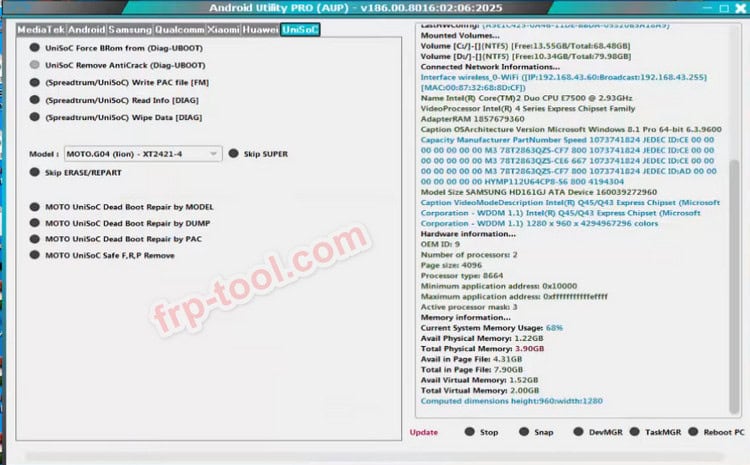
Android Utility Pro Tool, often referred to as Android Utility Tool or AUP PRO, is a Windows-based smartphone service toolkit that works with core system layers such as preloader, bootloader, modem, and protected partitions.
Unlike simple reset or unlock programs, it can
- Bypass FRP
- Remove screen locks
- Repair boot loops
- Fix baseband issues
- Flash firmware (PAC and image-based)
- Work in BROM, Meta, Fastboot, and ADB modes
- Dump, read, write, and format partitions
For technicians who deal with everything from soft-bricked phones to forgotten passwords, this tool effectively acts as a universal repair console.
Key Features of Android Utility Pro (2026 Edition)
FRP Bypass & Screen Lock Removal
AUP PRO includes dedicated bypass methods for major brands, including Samsung, Xiaomi, Oppo, Vivo, Infinix, Tecno, Itel, and Motorola. It handles:
- Factory Reset Protection bypass
- Pattern/PIN/password removal
- Account lock issues after a reset
- Newer security-patch protections
It also supports device-specific modes to improve detection and reduce errors.
Boot Repair & Firmware Flashing
The 2026 versions feature enhanced support for:
- MediaTek chipsets
- Unisoc chipsets, including T8100/T820
- Qualcomm devices in supported models
Boot-repair templates help technicians revive devices suffering from boot loops, corrupted system partitions, or crash-preloader issues.
Partition Level Tools
Android Utility Pro operates directly on low-level partitions. It can:
- Dump or back up NV, preloader, or modem partitions
- Write or format specific partitions without wiping the whole system
- Enter specialized modes like Meta or BROM
- Reboot devices into multiple engineering states
This fine-grain control is essential when handling damaged firmware or obscure models.
IMEI & Baseband Repair Workflows
When a device suffers software-related IMEI corruption or “unknown baseband” states, the tool provides restoration routines to rebuild the original values.
Note: IMEI modification for evasion or fraud is illegal. Use only for lawful restoration.
What’s New for 2026?
The latest 2025 builds v170, v182, v185, v186, v187, v192, and above include a long list of improvements.
Expanded Chipset, Brand & Android Version Coverage
The tool now supports:
- New Unisoc chipsets (T8100/T820 series)
- New MTK families and loader variations
- A wider range of Samsung, Xiaomi, Realme, Vivo, Oppo, Infinix, and Itel devices
- Android 14, 15, and early 16 support, depending on hardware
Safer Workflow & Visual Warnings
Critical operations (like formatting modem partitions) now trigger clear warnings. This reduces accidental data loss and helps protect inexperienced users.
More Stable Licensing & Anti-Tamper Protection
2026 versions distinguish between:
- Limited edition
- Unlimited edition
- Smartcard and no-smartcard builds
The tool boots more reliably and avoids many of the crash problems seen in cracked versions online.
Safe Installation & Downloading Practices
Because the tool operates at the lowest levels of Android firmware, safe installation matters.
Best Practices
- Download only from trusted mirrors or official community links.
- Avoid cracked builds, they often contain malware or corrupted loaders.
- Install recommended drivers before use.
- Use high-quality USB cables and avoid low-power USB hubs.
- Verify that Windows detects the phone in the correct mode (BROM, Meta, etc.).
Download Link – Android Utility Tool
File Name: Android Utility Tool v182.00.7012 (Fix Update Patch)
File Size: 184.94 MB
Developer: Mofadal Mohammed
Source: Facebook
License: FreePassword: mfdl
Download: Android Utility Tool v182 – Latest Updated Version
The Android Utility Tool v182.00.7012 is now available with the latest fix update patch. This version brings improved stability, performance enhancements, and updated features to support a wide range of Android devices. Developed by Mofadal Mohammed, this tool remains completely free for users and can be downloaded directly from the official release source.
Driver issues are the most common reason commands fail, so spending five minutes on proper setup saves hours of troubleshooting.
How Technicians Use It in Daily Work
FRP & Lock Removal Workflow
A typical job includes:
- Confirm device ownership.
- Connect in BROM/fastboot/Meta mode.
- Run the FRP or lock removal routine.
- Reboot and complete the setup without the previous account prompt.
Boot-Repair & System Recovery
For soft-bricked devices:
- Force the device into BROM or Meta mode.
- Back up NV or modem partitions if possible.
- Flash boot or system images.
- Repair baseband if needed.
- Reboot and test the network, Wi-Fi, and sensors.
Demo Mode & Region-Locked Firmware Fixing
The tool helps service:
- Retail demo phones (especially Vivo)
- Region-locked firmware restrictions
- Bloatware and non-standard factory images
This adds resale value to refurbished units.
Alternative Tools to Consider in 2026
While Android Utility Pro is powerful, technicians often use it alongside other tools:
- Official vendor flashing software (Samsung, Xiaomi, etc.)
- SP/MTK Flash tools
- Consumer-friendly GUI tools for simpler resets
A balanced toolkit uses AUP PRO for deep system-level tasks and the others for safer, brand-specific operations.
Ethical & Safety Guidelines
Because this tool interacts with critical device identifiers and protected areas:
- Only service devices you own or have permission to repair.
- Never bypass security for unauthorized access.
- Back up NV, modem, and calibration data before modifying.
- Keep detailed logs for each job.
- Respect local laws regarding FRP, IMEI, and refurbished devices.
Frequently Asked Questions
Is Android Utility Pro free?
Some builds are free to download, but full features may require licensed editions.
Is it safe to use cracked versions?
No. Cracked versions often contain malware or bad loaders that can hard-brick devices.
Does it support new Android versions?
Yes, support extends up to Android 14-16 on compatible devices.
Who should avoid using this tool?
Casual users. This tool is designed for technicians or experienced Android repair enthusiasts.
Final Thoughts
Android Utility Pro Tool in 2026 remains one of the most capable all-in-one repair utilities for Android devices. With expanded chipset support, stronger safety features, and improved workflows, it continues to be an essential tool for technicians and advanced users who need real, dependable control over system-level repairs.