If your Mi device is locked by FRP and you now want to “unlocker frp mi account remover”, then you can see this content. You know that from Android version 5 to the latest version, Google added a new feature named FRP. When someone adds a Google account to their smartphone, that time the FRP will automatically be activated on their smartphone. For that, if you forget your username or password and you have already reset your device, at that time you will see your device is fully locked by FRP. If you want to Mi FRP unlock from your Mi smartphone, then see this content.
If you added a Mi account on your Mi device and you want to reset your device, and at that time you accidentally forget your password, at this moment you won’t be able to reset your device without entering the correct password. So, if you want to mi an account, then you can follow this content. mi account unlock tool password key.
Unlocker Frp MI Account Remover Tool Download
FRP is a system that automatically activates on the smartphone device when you log in to your Google account. It protects your device from theft, but in some cases, if you forget your Google account password or username, that time FRP will lock your smartphone if you have already reset the data of your device.
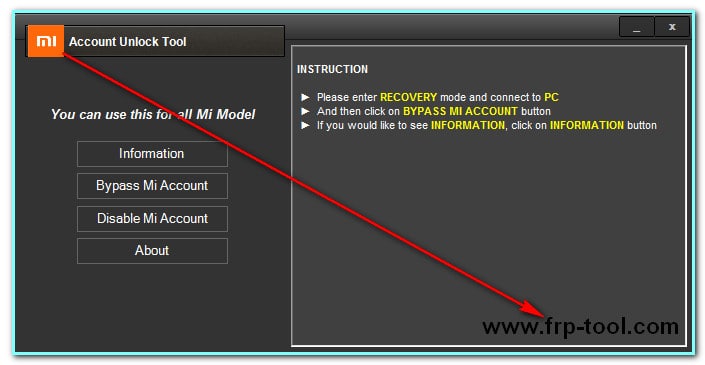
Method 1: Unlocker frp mi account remover
If your MI device is locked by FRP and you now want to unlock FRP, then you can see this content.
How to bypass Mi account
If you want to delete your Mi account from your Mi device, then you need to use the Mi account unlock tool. Many people are looking for the mi account unlock tool password, and for those people, here we giveit without a password, so you don’t need to enter the password.
Now see how to mi delete Mi account.
- First, download the Mi Account Unlock Tool from the link, unzip winrar/7 zip Mi Account Unlock Tool.ra,r and install it on your pc. But make sure that you disable the antivirus program on your pc if your pc has any antivirus program.
- After downloading the file then you can see the file in the RAR format, so extract it by using any unzipping tool.
- Run “MiAccountUnlock Tool.exe.”
- Now turn off your Xiaomi device and into Recovery Mode. So, press the Volume Up Button with the Power On button at once and at the same time and hold them until you see Mi Logo.
- Now connect your device to the pc by using an original data cable or a better USB data cable.
- In the software, you need to click on the information to check if your device is connected or not. If you see your device is connected correctly, then go to the next step, but if you see your device isn’t connected to your pc then go back and install the USB driver properly on your pc. Make sure it without installing the correct USB driver, you will not be able to connect your smartphone to the computer.
- Now ,see the Mi account unlock tool and click on the Bypass Mi Account for Mi account reset. Now, wait for a moment to complete the action.
Download Mi Account Unlock Tool
File Name: Mi Account Unlock Tool.rar
Developer: Mobile Software Advance
File Type: RAR
Version: 1.0
Size: 3.47 MB
Supported OS: Windows 7/8/8.1/10
Download→ Mi Account Unlock Tool
Method 2: Unlocker frp mi account remover
If you were not successful in removing FRP from your Mi device, then you can try this method. In this method, you need to flash your MI device by following our instructions. Now see how to use this method.
Required file

- Download all model miui 11 fastboot rom → Mi Fastboot rom
- Mi Flash tool→ Gdrive 94.MB
- First, you need to download MI firmware and MI flash file from the download link and keep the firmware is MIUI v6.
- Now install the Mi Flash tool with Mi suit for the driver’s issue. You can also directly download and install the driver from another source.
- Extract the firmware by using any tool like WinRAR, 7-Zip, etc.
- Now open the Mi Flash tool and click on the button image, and choose extracted files.
- Connect your device to the pc by using a USB data cable and put your device in download mode. But you just need to shut down your device, then connect the device. Sometimes it will fail to connect the phone to the pc, for that first click on the download option from the Mi Flash tool, then connect your device.
- Now, usually, flash your Mi smartphone.
- After flashing your device, it will take more time to start because all the files will be run after installation by pc.
- Don’t touch your smartphone while it is installing in the background.
- Normally, it will take more than 10 minutes to complete.
- If you finish all the poses one by one, then you will succeed in unlocking your mobile phone.
- When you are successful, never upgrade your device because if you upgrade then, then it will be locked again.
If you follow all posses step by steps, then I can be sure that you will be able to use “unlocker frp mi account remover successfully.” But in this content, we discuss two methods to solve this problem. You can try anyone, but if you follow the 2nd method that time must download the correct firmware; if you download the incorrect file, then you will not be able to delete the Mi account. Always use an original data cable or a better USB data cable for flashing your smartphone. When your phone is flashing at that time, don’t touch it or disconnect. You can find the files in a zip format, so extract them by using the unrar or 7zip tool, and when you try to extract that time your antivirus program shuts off.